Own your commerce data.
Bring Shopify and Lightspeed into Follow, then activate in Klaviyo. One layer, normalized data, syncing both ways.
No credit card · ~10 min to first sync


Trusted on the stack
Retail brands that run with Follow
From independents to multi-location groups — teams use Follow to keep POS, email, and revenue data aligned in one layer.








Your logos belong here too — same connections, one home for the data.
One platform. Every pipe.
Stop duct-taping exports. Follow is the control plane for commerce data — connect once, own it, send it anywhere.
Connect everything
One-click OAuth across your stack — Shopify, Lightspeed, Klaviyo, and the tools you already run. Live sync without the integration project.
Own your data
One normalized layer: customers, orders, revenue, inventory — clean, deduped, and yours. No black boxes. No vendor lock-in on the truth.
Release it anywhere
Activate in Klaviyo, push to BI, export, or pipe to your warehouse. Follow is the home base; you choose every destination.
How it works
Live in 10 minutes.
No developer. No six-month project. Connect → normalize → activate.
Follow sits between your channels and your destinations so data stays consistent before it ever hits email or BI.
Connect
OAuth into Shopify, Lightspeed, Klaviyo, and more. Follow pulls the sources you authorize — fast, scoped, revocable.
Normalize
Orders, customers, and revenue land in one schema. Dedupe, map, and clean automatically — your single source of truth.
Activate
Push to Klaviyo, export, or stream out. Same data, every channel — you decide where it goes next.
Dashboard
What you'll see in the app
Example view of the Follow Data Layer: sync health, connected sources (Shopify, Lightspeed, Klaviyo), recent syncs, and quick actions — all in one dark, operator-first workspace.
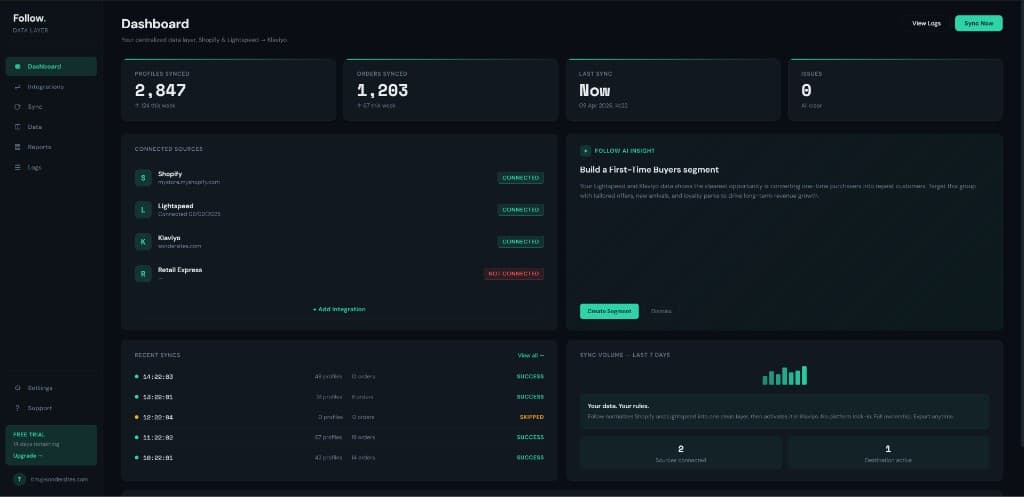
Layout and metrics shown are representative — your workspace reflects your live connections and data.
Who it's for
Built for operators at every scale.
One store or fifty client workspaces — Follow scales with you.
Proof
What teams say about Follow
Composite of what we hear on sales calls and onboarding — all framed for Follow, the product we ship today.
“Follow is the first time POS, email, and revenue actually feel like one system. We finally plan campaigns from the same numbers the stores see.”
Marketing lead
Multi-location brand
“We didn't want another connector — we wanted a layer we could trust. Follow normalized everything, then let us push to Klaviyo and our sheet replacements without drama.”
Head of growth
Omni retail · AU
“Security mattered as much as speed. Follow keeps our commerce data in one audited layer; we decide which tools get keys. That's the operating model we needed.”
Ops director
Agency partner network
FAQ
Questions, answered
Connectivity, ownership, and where your data can go with Follow.
What data does Follow sync between Lightspeed Retail and Klaviyo?↓
Follow syncs customer profiles (respecting email preferences), in-store sales, and order-level detail — including product categories and brands tied to each purchase. Rules can exclude orders that originated outside your POS (for example Shopify or other e‑commerce) so Klaviyo reflects true retail behaviour.
How does Follow prevent duplicate profiles in Klaviyo?↓
Before each sync, Follow checks whether a customer or order already exists so profiles stay aligned instead of multiplying. You get one clean view of each person across channels.
Why use Follow instead of manual exports or one-off integrations?↓
You own a single normalized layer: in-store and online behaviour feed segments, automations, and reporting without spreadsheet stitching or brittle API scripts. Less ops overhead, fewer mistakes.
What should I know technically about how sync works?↓
Expect field mapping for contacts and orders, configurable sync frequency, optional historical backfill on setup, filters (for example POS-only orders), monitoring with retries, and sensible handling of API rate limits.
Where does my data live, and can I use it outside Follow?↓
Your commerce data is consolidated in Follow’s layer — built for clarity and security — then you choose where it goes: Klaviyo, BI tools, warehouses, or exports. No lock-in on how you activate it.
Want the full story? About Follow
Get started
Ready to own
your data?
Connect every system. Keep it clean in Follow. Pipe it anywhere your business runs — campaigns, BI, or warehouse.